

Ready to start your internship?
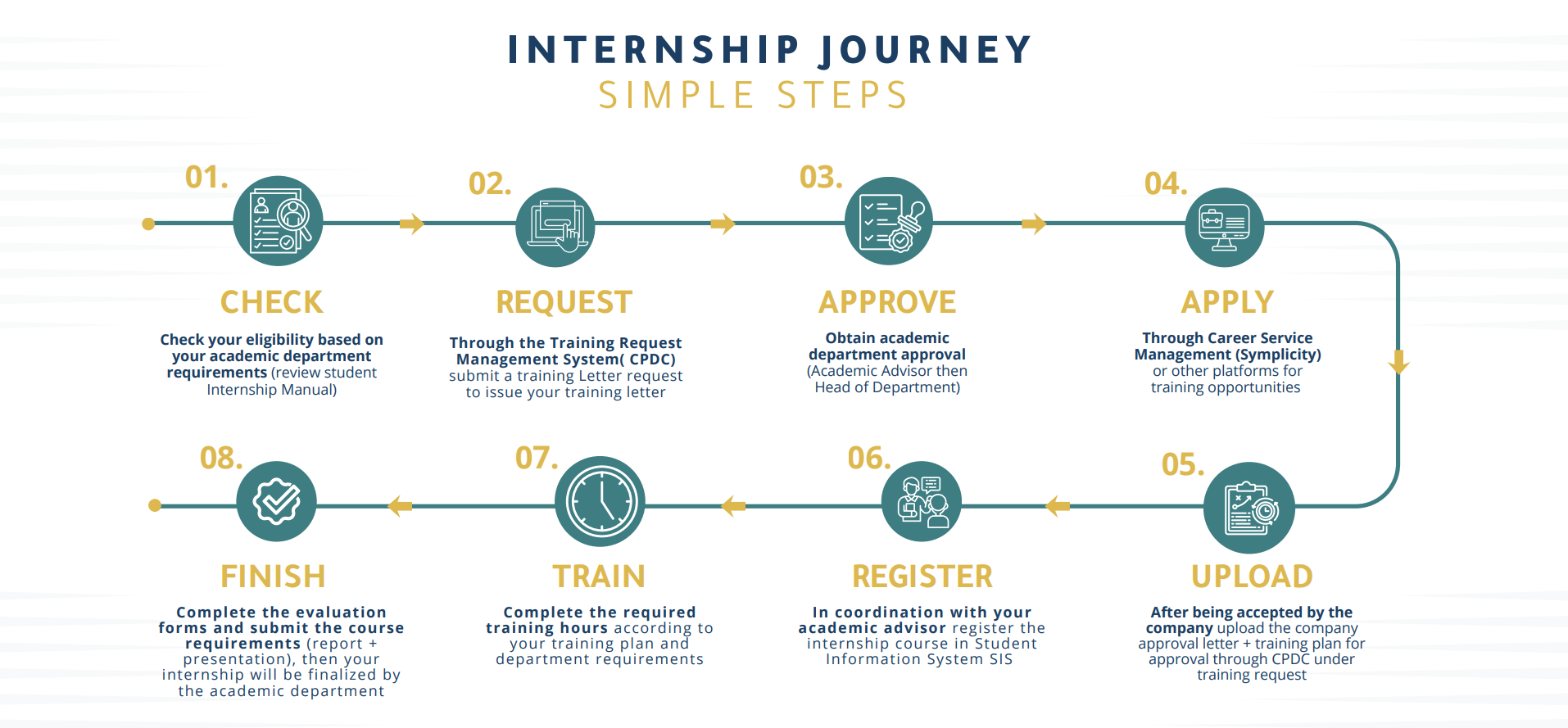
The Career & Professional Development Center is with you step by step:
Check your eligibility based on your academic department requirements. (Internship Manual)
Through the CPDC system: ubmit a Training Letter request to issue your training letter.
Obtain academic department approval (Academic Advisor, then Head of Department).
Apply for training opportunities through Symplicity or other platforms.
After being accepted by the company: through CPDC, upload the Training Plan and the Employer Approval Letter under Training Request.
In coordination with your academic supervisor: register the internship course in SIS and start your training.
Complete the required attendance/training hours according to your training plan and department requirements.
8. Finally: complete the evaluation forms and submit the course requirements (report + presentation), then your internship will be finalized by the academic department.
Student Internship Journey
How to use Training Request Management System( CPDC) ?
Career Service Management (Symplicity)
Internship Champions – Success Stories
Real stories. Real impact. Meet some of our UPM Internship Champions who turned opportunities into success.
“A simple visit to the Career Center changed everything. After being guided and supported, I was accepted for training at Saudia Technic among only 26 students out of 4000 applicants. It was life-changing.”

Renad Alsuhaymi – Cybersecurity and Forensic Computing
“My experience at the National Water Company exceeded all expectations. The internship was more than training — it was a turning point in my professional path.”

Nawfaa Alrashidi – Management
“Through the Career Center, I found an internship that matched my passion. It connected me to mentors and helped me grow into my field with confidence.”

Mohammed Alnakhli – Electrical Engineering
“From classroom to career — my internship at the National Water Company prepared me for the job market with confidence and skill.”

Amal Alawaji – Finance
Internship Consultation Sessions:
In every university journey, there is a defining moment that changes your direction— For UPM students, that moment often begins with the internship.
The Career and Professional Development Center is pleased to offer you dedicated guidance through the internship inquiry counseling session on Career Service Management platform Symplicity.
This session is your chance to:
Understand internship requirements and steps
Learn the best ways to find a suitable training organization
Knowing the required documents and how to prepare professionally
If you're preparing to transition from the classroom to a real-world, practical experience, we invite you to book your appointment and embark on an inspiring training journey that will open doors to your future through the Career Service Management Symplicity Booking steps:
Booking steps:
Log in to Symplicity
Select Counseling
Click Request New Appointment
Choose internship inquiry session
Select a suitable time and confirm
Start now— internship is not just a requirement; it’s the first chapter of your professional success story Bok your appointment via: Students: Sign-in method
Training Request Management System( CPDC)
How to Request a Training Letter via the CPDC System (Training Letter)
Log in to the CPDC app
From the menu, select the “Summer/Coop Training” tab.
Select the Training Letter option
From the list, click “Training Letter.”
Create a new Training Letter request
Click “New Training Letter.” You can also view previous requests and their approval status (if any) on the Training Letters page.
Enter your personal and academic information
Complete the required fields shown in the form (full name in Arabic, mobile number, earned credit hours, GPA, academic level), then click “Next.”
Enter department information
Select your academic advisor and write their name in Arabic.
Enter training details
Choose the training type (Summer or Co-op), whether it is mandatory or optional, and select the start and end dates.
Note: Custom letter addressed to a specific training organization
If the training organization requests a letter addressed by name, choose “Custom Letter,” then enter the company name in both languages, the region, and the official website / official social media accounts. Company information must be entered accurately to ensure approval.
Agree and submit
Read the terms and conditions, agree to them, then click “Submit.”
Tracking your Training Letter request
You will receive an email notification with the request status, and you may log in to the system to view details.
After approvals are completed by the Academic Advisor and Head of Department, you can download the letter directly from the system and/or via email.
How to Submit a Training Request for Plan Approval (Training Request)
Access the Training Request option
After obtaining the Training Letter, the “Training Request” option will become active.
Create a new Training Request
Click “New Training Request.” You can also view previous requests and their approval status (if any) on the Training Requests page.
Complete the general information
Verify your information, academic advisor, and training dates, then click “Next.”
Enter company information
Enter the training organization name, city, supervisor name, contact number, and email address.
Upload the required attachments
Upload the training plan and the company acceptance letter in PDF format, then click “Submit.”
Confirm the start of training
After the Training Request is approved by the Academic Advisor, you must switch “Confirmed Training” to “Yes.”
Tracking your Training Request
=You will receive an email notification with the request status, and you may log in to the system to view details.
After approvals are completed by the academic advisor and Head of Department, you can confirm the training by switching “Confirmed Training” to “Yes.”
Key Dates:
Summer Term Internship Key Dates — Academic Year 2026
In support of early planning to your internship, below are the key dates approved in the University Academic Calendar for AY 2026:
Summer registration starts: 14 June 2026
Summer classes begin: 28 June 2026
Summer term duration: 8 weeks (7 weeks of classes + 1 week of final exams)
Final exams start: 16 August 2026
Summer term ends: 20 August 2026
Tools and Systems:
UPM provides digital tools to simplify your internship experience and keep you on track.
Training Request Management System( CPDC)
Automates internship approvals. Students can request training letters, upload plans, and track approval status in real time.

Career Service Management Portal (Symplicity)
Your gateway to internships and job readiness. Explore vacancies, book counseling sessions, and access career development tools.

Useful Resources:
The following resources are available to guide you throughout your internship journey:
Training Request Management System( CPDC) Guide
Step-by-step tutorial on how to request letters and approvals
Career Service Management (Symplicity) Guide
Learn how to explore vacancies and book sessions

Contact Us
Location:
Male Campus: Main Building — C121
Female Campus: Main Building — C200
Working Hours: Sunday to Thursday | 8:00 AM – 4:00 PM